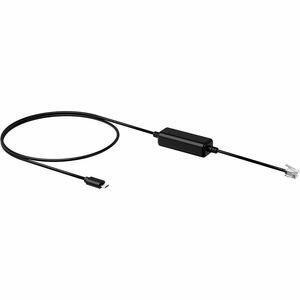
Yealink EHS35 Wireless Headset Adapter | EHS RJ9 Remote Call Control | T3X T4X T5X WH62 WH63 | MPN: 330000103001
Yealink EHS35 Wireless Headset Adapter | EHS RJ9 Remote Call Control | T3X T4X T5X WH62 WH63 | MPN: 330000103001
Low stock: 5 left
Couldn't load pickup availability
Free shipping across the continental US & free returns
Description
Yealink EHS35 Wireless Headset Adapter for Enhanced IP Phone Control
This is a Yealink EHS35 Wireless Headset Adapter, an advanced Electronic Hook Switch (EHS) solution designed to provide seamless integration between your Yealink IP desk phone and a compatible Yealink wireless headset. With MPN 330000103001 and UPC 841885105097, this adapter significantly enhances productivity by enabling comprehensive remote call control functionalities directly from your headset, making it an essential accessory for modern business communication environments.
Key Features of the Yealink EHS35 Headset Adapter
- Seamless Integration: Provides a technical interface to connect your Yealink wireless headset directly to your Yealink IP desk phone, streamlining your communication setup.
- Full Remote Call Control: With compatible Yealink IP phones, gain the ability to remotely answer, reject, hold, mute, hang up, switch between multiple calls, and adjust the volume directly from your wireless headset.
- Plug-and-Play Installation: The unit is easy to install; simply connect the EHS35 to the RJ9 (4P4C) headset port on your desk phone for quick setup.
- Enhanced Productivity: Specially designed to ensure maximum productivity in demanding business applications such as receptions and call centers, allowing users greater mobility and efficiency.
- Broad Business Application: Ideal for various market sectors including Corporate, Financial, Health, Government, Educational, Industrial, and SME/SoHo environments.
- Headset Compatibility: Fully supports Yealink WH62 and Yealink WH63 wireless headsets for optimal performance.
Comprehensive Technical Specifications
| Specification | Details |
|---|---|
| Brand | Yealink |
| Manufacturer | Yealink Network Technology Co., Ltd |
| Product Model | EHS35 |
| Product Name | EHS35 - Wireless Headset Adapter |
| Product Type | Headset Adapter |
| Manufacturer Part Number (MPN) | 330000103001 |
| UPC | 841885105097 |
| Connectivity Interface | RJ9 (4P4C) for headset connection |
| Application/Usage | Headset, IP Phone |
| Weight | 0.10 lbs |
| Height | 1.00 inches |
| Width | 4.00 inches |
| Depth | 6.00 inches |
| Remote Control Compatibility (Yealink IP Phones) | Yealink T3X, T4X, T5X, T30, T30P, T31, T31P, T31G, T33P, T33G |
| Audio Only Compatibility (Desktop Phones) | Yealink, Avaya, Poly, Snom, Grandstream, Fanvil |
| Headset Compatibility | Yealink WH62 Headset, Yealink WH63 Headset |
Installation & Maintenance Guide
The Yealink EHS35 is designed for straightforward installation, ensuring you can quickly integrate it into your existing communication setup.
- Initial Connection: Simply connect the EHS35 adapter to the RJ9 (4P4C) headset port on your compatible Yealink desk phone.
- Headset Pairing: Ensure your Yealink WH62 or WH63 wireless headset is properly paired and connected to its base station.
- Configuration (if needed): For optimal remote control functionality, refer to your specific Yealink IP phone's user manual for any necessary EHS settings or firmware updates.
- Testing: Make a test call to verify that remote call control features (answer, hang up, volume) are functioning correctly from your wireless headset.
- Maintenance: The EHS35 requires minimal maintenance. Keep it in a clean, dry environment and avoid physical damage to ensure longevity.
Pro Tip: Always ensure your Yealink IP phone and wireless headset have the latest firmware installed to guarantee full compatibility and access to all EHS features.
Why Choose the Yealink EHS35 Wireless Headset Adapter?
The Yealink EHS35 is an indispensable tool for professionals seeking to maximize their communication efficiency. By enabling remote call control, it frees users from their desks, allowing for greater mobility and multitasking during calls. Its plug-and-play design ensures easy setup, while its robust compatibility with Yealink's leading IP phones and wireless headsets guarantees a reliable and integrated communication experience. Invest in the EHS35 to transform your desk phone into a powerful, hands-free communication hub, perfect for dynamic work environments.
Enhance your communication workflow with the Yealink EHS35 Wireless Headset Adapter—Order yours today!
Brand: Yealink
Model: EHS35
Type: Headset Adapter
Features: Wireless
Color: Black
Interface: RJ9
MPN: 330000103001
UPC: 841885105097