StarTech.com PEX1P2 1-Port Parallel PCIe DB25 LPT Card SPP/ECP
StarTech.com PEX1P2 1-Port Parallel PCIe DB25 LPT Card SPP/ECP
Low stock: 5 left
Save 16%
Couldn't load pickup availability
Free shipping across the continental US & free returns


Description
StarTech.com PEX1P2 1-Port Parallel PCIe Card - PCI Express to DB25 LPT Adapter SPP/ECP
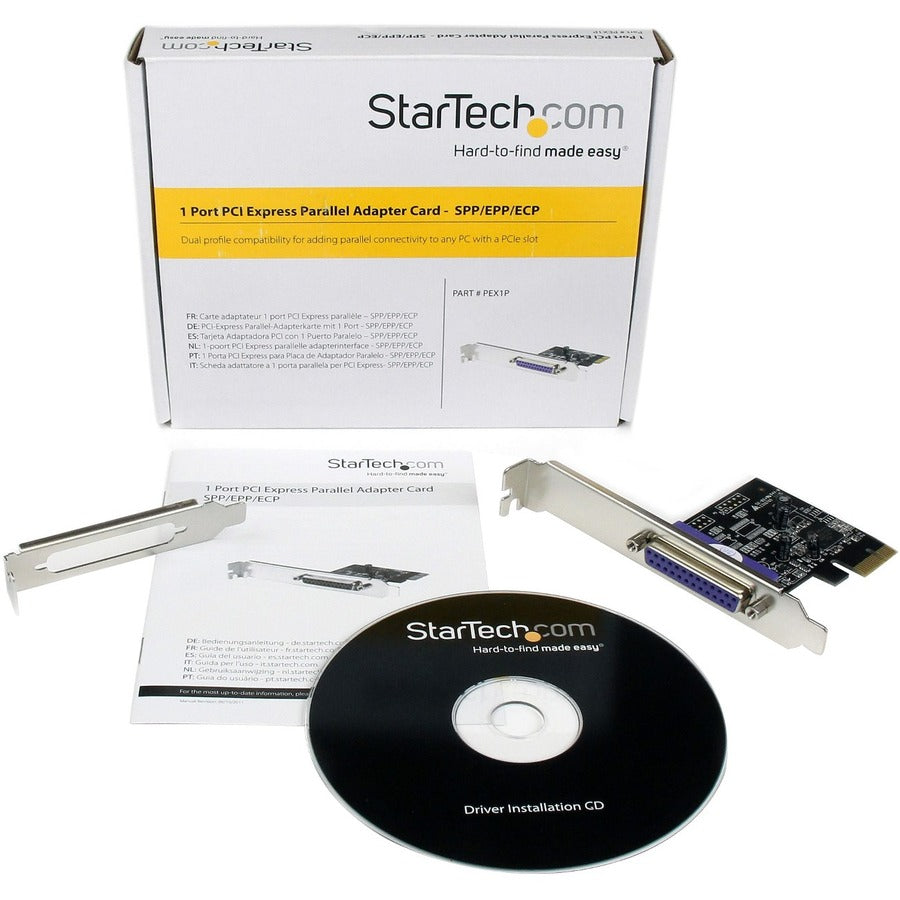
This is a StarTech.com 1-Port Parallel PCIe Card, a PCI Express to Parallel DB25 LPT adapter card designed as a desktop expansion controller for printers supporting SPP/ECP modes. The PEX1P2 adds a legacy DB-25 parallel port to modern PCI Express systems, enabling connection of parallel printers, scanners, or other LPT devices. MPN: PEX1P2; UPC: 065030891400. Ideal for users needing reliable parallel port expansion in desktops.
Key Features of StarTech.com Parallel PCIe Adapter
- Native PCI Express Chipset – ASIX AX99100 controller provides direct PCIe x1 integration without bridges for optimal performance and compatibility.
- IEEE 1284 Compliance – Supports SPP, ECP, EPP, and bidirectional modes for high-speed data transfer up to 1.5 Mbps with printers and legacy peripherals.
- DB-25 Parallel Port – Standard LPT connector matches classic parallel devices; includes low-profile bracket for compact cases.
- Broad OS Support – Compatible with Windows 11/10/8.1/8/7/Vista/XP/Server editions, Linux kernels 2.4.x to 3.x+, and DOS.
- Half-Height/Low-Profile Design – Fits standard and slim desktop chassis; plug-and-play in most PCIe slots.
- Desktop Expansion – Revives parallel connectivity for older hardware in new systems without external adapters.
Comprehensive Technical Specifications
| Specification | Details |
|---|---|
| Manufacturer | StarTech.com |
| MPN | PEX1P2 |
| UPC | 065030891400 |
| Weight | 0.30 lb |
| Height | 1.40 in |
| Width | 5.80 in |
| Depth | 18.30 in |
| Host Interface | PCI Express x1 |
| Ports | 1 x DB-25 Parallel (Female) |
| Chipset | ASIX AX99100 |
| Data Transfer Rate | Up to 1.5 Mbps |
| IEEE 1284 Support | SPP/ECP/EPP/Compatible |
| Card Type | Low Profile / Half-Height |
| OS Compatibility | Windows 11/10/8.1/8/7/Vista/XP/Server 2008/2003, Linux 2.4.x - 3.x+, DOS |
| Product Dimensions | 82 x 18 x 121 mm [3.2 x 0.7 x 4.8 in] |
| Weight of Product | 59 g [2 oz] |
Installation Guide for Parallel PCIe Card
Standard PCIe installation typically takes 5-10 minutes; power off system first for safety.
- Prepare: Shut down PC, unplug power. Open case and locate available PCIe x1 slot. Pro tip: Use anti-static wrist strap.
- Install Card: Remove bracket cover, insert card firmly into slot, secure with screw. Attach low-profile bracket if needed.
- Boot & Drivers: Power on, install drivers from included CD or StarTech website. Windows often auto-detects.
- Test: Connect parallel device, verify in Device Manager. Note: Print test page to confirm SPP/ECP modes.
- Maintenance: Dust-free environment; no user-serviceable parts.
Why Choose StarTech.com PEX1P2 Parallel Adapter
StarTech.com delivers proven reliability for legacy parallel expansion with native chipset performance, ensuring seamless integration for printers and industrial devices in modern desktops.
Add parallel port capability to your PCIe desktop—Order StarTech.com PEX1P2 today!
MPN: PEX1P2
Compatible Brand: Startech.com
Compatible Port: PCI Express x1
External Interfaces: Parallel (IEEE 1284)
Number of Ports: 1 Port
Model: PEX1P2
Brand: Does not apply
Type: Does not apply
UPC: 065030891400