Dell MSA20 Single Monitor Mounting Arm
Dell MSA20 Single Monitor Mounting Arm
Low stock: 5 left
Couldn't load pickup availability
Free shipping across the continental US & free returns


Description
Dell MSA20 Single Monitor Mounting Arm
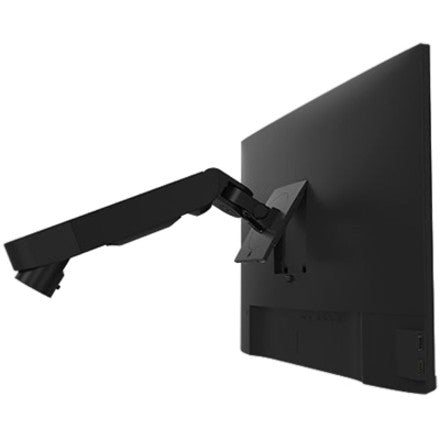
This is a Dell MSA20 Single Monitor Mounting Arm designed for elevating and adjusting a single monitor display. The Dell Mounting Arm for Monitor supports VESA-compatible screens with integrated cable management for a clean workspace setup. MPN: DELL-MSA20; UPC: 884116352143. Compatible with monitors up to 34 inches and 9 kg weight capacity from Dell Technologies.
Key Features of Dell MSA20 Monitor Arm
- Full Adjustability – Height adjustment up to 13 inches (330 mm), tilt from -70° to +5°, swivel ±90°, and 360° rotation for optimal viewing angles.
- VESA Compatibility – Fits 75 x 75 mm and 100 x 100 mm patterns, supporting monitors up to 34 inches or 9 kg (19.8 lbs).
- Mounting Options – Desk clamp or grommet installation for secure desk attachment.
- Cable Management – Built-in channels to route and hide cables, reducing desk clutter.
- Ergonomic Design – Frees up desk space and promotes better posture with arm extension up to 21.5 inches (545 mm).
- Durable Construction – Engineered by Dell for reliable daily use in office or home setups.
Comprehensive Technical Specifications
| Specification | Details |
|---|---|
| Brand | Dell |
| Manufacturer | Dell Technologies / Dell Commercial |
| Product Name | Single Arm Monitor - MSA20 / Dell Mounting Arm for Monitor |
| Product Type | Mounting Arm |
| Manufacturer Part Number / MPN | DELL-MSA20 / DELLMSA20 |
| UPC | 884116352143 |
| Device Supported | Monitor |
| Maximum Display Size | 34 inches |
| Maximum Weight Capacity | 9 kg (19.8 lbs) |
| VESA Compatibility | 75 x 75 mm, 100 x 100 mm |
| Height Adjustment | 330 mm (13 inches) |
| Tilt Range | -70° to +5° |
| Swivel Range | ±90° |
| Rotation / Pivot | 360° |
| Arm Extension | Up to 545 mm (21.5 inches) |
| Mounting Type | Clamp, Grommet |
| Cable Management | Integrated |
| Package Weight | 11.40 lbs |
| Package Dimensions (H x W x D) | 6.60 x 10.30 x 16.80 inches |
Installation Guide for Dell MSA20 Monitor Arm
Professional setup recommended; typically completes in 20-30 minutes with basic tools.
- Desk Prep: Select clamp or grommet mount location; ensure desk thickness 0.4-3.3 inches for clamp.
- Attach Base: Secure to desk edge or hole; tighten fully.
- Arm Assembly: Connect segments and adjust tension for smooth movement.
- Mount Monitor: Align VESA plate; route cables through management clips.
- Adjust & Test: Set height, tilt, swivel; verify stability with monitor weight. Pro tip: Balance arm before attaching screen.
- Maintenance: Periodically check tightness; wipe with dry cloth.
Why Choose Dell MSA20 Single Monitor Arm
Dell engineering ensures precise adjustability and robust support for productive workspaces, with verified compatibility for standard VESA monitors.
Elevate your setup with the Dell MSA20 Monitor Arm—Order today!
Brand: Dell
Type: Mounting Arm
Color: Black
MPN: DELL-MSA20
Number of Monitors: 1
VESA Size: 75x75 mm
Adjustment: Tilt & Rotate
UPC: 884116352143